How to Automatically Rename Files Using AI (10+ Real World Use Cases)

Manually renaming files is one of those invisible productivity killers. A McKinsey study found that employees spend up to 19% of their workweek searching for information.
Invoices, PDFs, screenshots, photos, scans, exports, reports, research articles…
They all arrive with filenames like:
IMG_4029.jpgscan_2026_01_05.pdfDocument (14).pdffinal_final_v3.png
And once folders grow, everything becomes harder to search, reuse, or audit.
Today, AI-powered file renaming changes this completely.
Instead of relying on filenames, AI can analyze file content (text, images, layout, context) and generate clear, descriptive, and consistent filenames automatically.
This guide shows how to automatically rename files using AI, with real workflows across accounting, legal, creative, business, education and personal use cases.
All examples below are powered by AI Renamer, a desktop tool that works on Windows and macOS with full privacy options.
What Does “Automatically Rename Files Using AI” Mean?
Traditional renaming tools work on patterns:
- replace text
- add prefixes
- increment numbers
AI-based renaming works differently.
AI analyzes:
- text inside PDFs
- visual content inside images
- document structure
- common layouts (invoice, resume, report, contract, etc.)
Then it generates filenames that describe what the file actually is, not how it was saved.
Example:
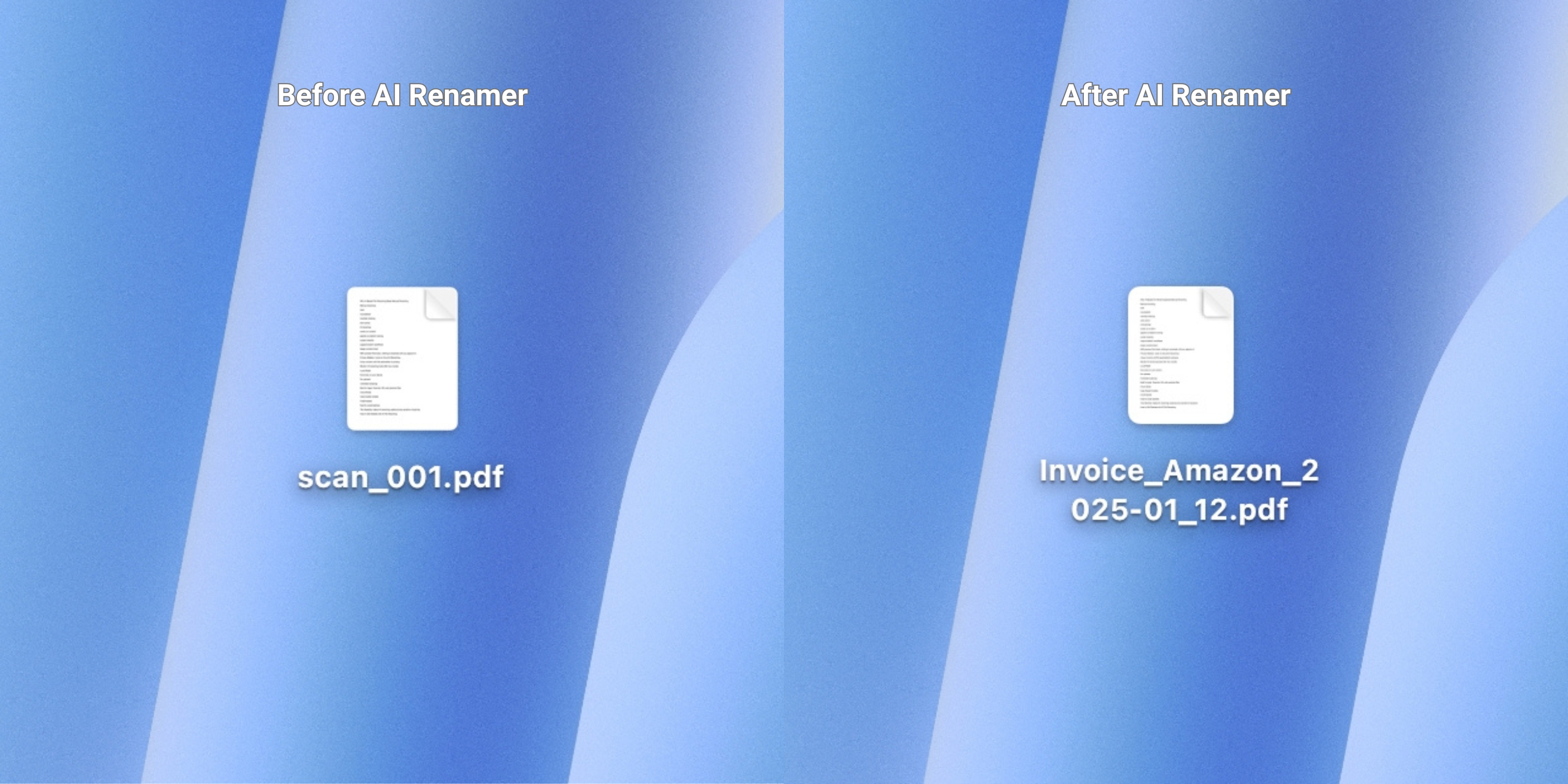
scan_001.pdf → Invoice_Amazon_2025-01-12.pdf
No rules, no scripts, no regex.
10+ Real-World Ways to Automatically Rename Files Using AI
Below is a curated list of real-world AI file renaming workflows, organized by profession and use case, with links to detailed step-by-step guides.
How to Automatically Rename PDFs for Accountants Using AI
 Automatically rename PDF files with AI. Organize invoices, bank statements, receipts, and tax forms in seconds with clean, content-aware filenames.
How to Automatically Rename Photos for Photographers Using AI
 Batch rename photos automatically with AI. Fast and private renaming for photographers including weddings, newborns, travel, food, pets, and everyday images.
How to Automatically Rename PDFs for Students Using AI
 Automatically batch rename student PDFs using AI. Rename lecture notes, assignments, and research papers instantly with full privacy on your device.
How to Automatically Rename UI Assets for Designers Using AI
 Automatically batch rename UI assets with AI. Organize icons, components, screens, mockups, and exports in seconds with clean, consistent filenames.
How to Automatically Rename Product Images for E-commerce Sellers Using AI
 Automatically batch rename product images with AI. Clean up messy filenames and organize your store assets in seconds.
How to Automatically Rename Images for Social Media Creators Using AI
 Bulk image renaming with AI. Automatically rename images, memes, screenshots, and thumbnails using content-aware filenames.
How to Automatically Rename Scanned PDFs for Lawyers Using AI
 Automatically rename scanned legal PDFs with AI. Organize discovery, pleadings, exhibits, and court filings using clear, content-based filenames.
How to Automatically Rename PDFs for HR Professionals Using AI
 Rename HR PDF files with AI. Instantly organize resumes, onboarding forms, reviews, and policy documents with clean filenames.
How to Automatically Rename Files for Digital Archive Enthusiasts Using AI
 Automatically batch rename scans, photos, PDFs, and documents with AI. Keep your digital archive searchable, consistent, and easy to browse.
How to Automatically Rename Photos for Home Inspectors Using AI
 Automatically batch rename inspection photos with AI. Turn IMG_4829.jpg into clear, searchable filenames like kitchen-sink-leak-under-cabinet.jpg in minutes.
How to Automatically Rename AI-Generated Images Using AI
 Automatically rename AI generated images in seconds. Batch rename files from Midjourney, Leonardo, Seedream, Nano Banana, and Stable Diffusion.
How to Automatically Rename Files for Notion, Obsidian, and PKM Users Using AI
 Batch rename files for Notion, Obsidian, and PKM using AI. Clean up PDFs, images, and screenshots before adding them to your knowledge base.
How to Automatically Rename Photos for Real Estate Agents Using AI
 Batch rename real estate listing photos using AI. Organize property images fast with clean, searchable filenames.
How to Automatically Rename Insurance Images and PDFs Using AI
 Automatically batch rename insurance images and PDF files using AI. Organize claim photos, inspection reports, and documents with clean, searchable filenames.
Why AI-Based File Renaming Beats Manual Renaming
Manual renaming:
- slow
- inconsistent
- mentally draining
- error-prone
AI renaming:
- works on content
- applies consistent naming
- scales instantly
- supports batch workflows
- keeps context intact
With preview-first tools, nothing is renamed until you approve it.
Privacy Matters: Local vs Cloud AI Renaming
A key concern with file automation is privacy.
Modern AI renaming tools offer two modes:
Local Mode
- Runs fully on your device
- Unlimited renaming
- Best for legal, financial, HR, and personal files
Cloud Mode
- Uses hosted models
- Credit-based
This flexibility makes AI renaming usable across sensitive industries.
How to Get Started with AI File Renaming
If your folders look like this:
IMG_4029.jpgscan_2026_01_05.pdfDocument (14).pdf
You’re not doing anything wrong.
That’s how files arrive.
AI-powered file renaming simply fixes the last broken step of modern workflows.
Rename files once and everything downstream becomes easier.
👉 Try AI Renamer: airenamer.app