How to Rename Your Files with AI (No Coding Needed)

AI Renamer Makes File Naming Effortless, Even Without Technical Skills
Renaming files one by one is a boring time sink. Whether you’re sorting invoices, research articles, product photos, or client documents, it adds up fast.
The good news is you don’t need to write a single line of code to automate it anymore. It’s a no-code file renamer built for everyone.
You can use AI Renamer to rename files with AI free, instantly organizing hundreds of files using smart AI that understands your file content. If you want to get more information about AI Renamer → What is AI Renamer?
And you can start for free. No subscription needed. After than if you like it, you can either buy credits for cloud mode or purchase local mode with a one-time payment.
💡 What You’ll Learn
- How AI file renaming actually works
- How to rename your files in bulk without coding
- How to use AI Renamer for privacy (local mode)
- Tips for privacy, accuracy, and naming patterns
🔍 Why Rename Files with AI
AI-powered renaming isn’t just about saving clicks. It gives you structured, descriptive, and consistent file names every time.
Instead of random names like:
| Random File Names |
|---|
| IMG_1023.jpg |
| Scan_123.pdf |
| Screenshot_2025-04-02.png |
You can instantly get:
| AI-Renamed File Names |
|---|
| 2025-04-02-bank-statement-jpmorgan.pdf |
| Invoice-ClientName-2025-09.pdf |
| meeting-notes-project-a.pdf |
No regex. No scripts. No coding.
⚙️ Step-by-Step: How to Rename Files with AI Renamer
1. Download AI Renamer
Visit airenamer.app and download the app for Windows or Mac.
Installation takes less than a minute.
2. Choose Your Mode
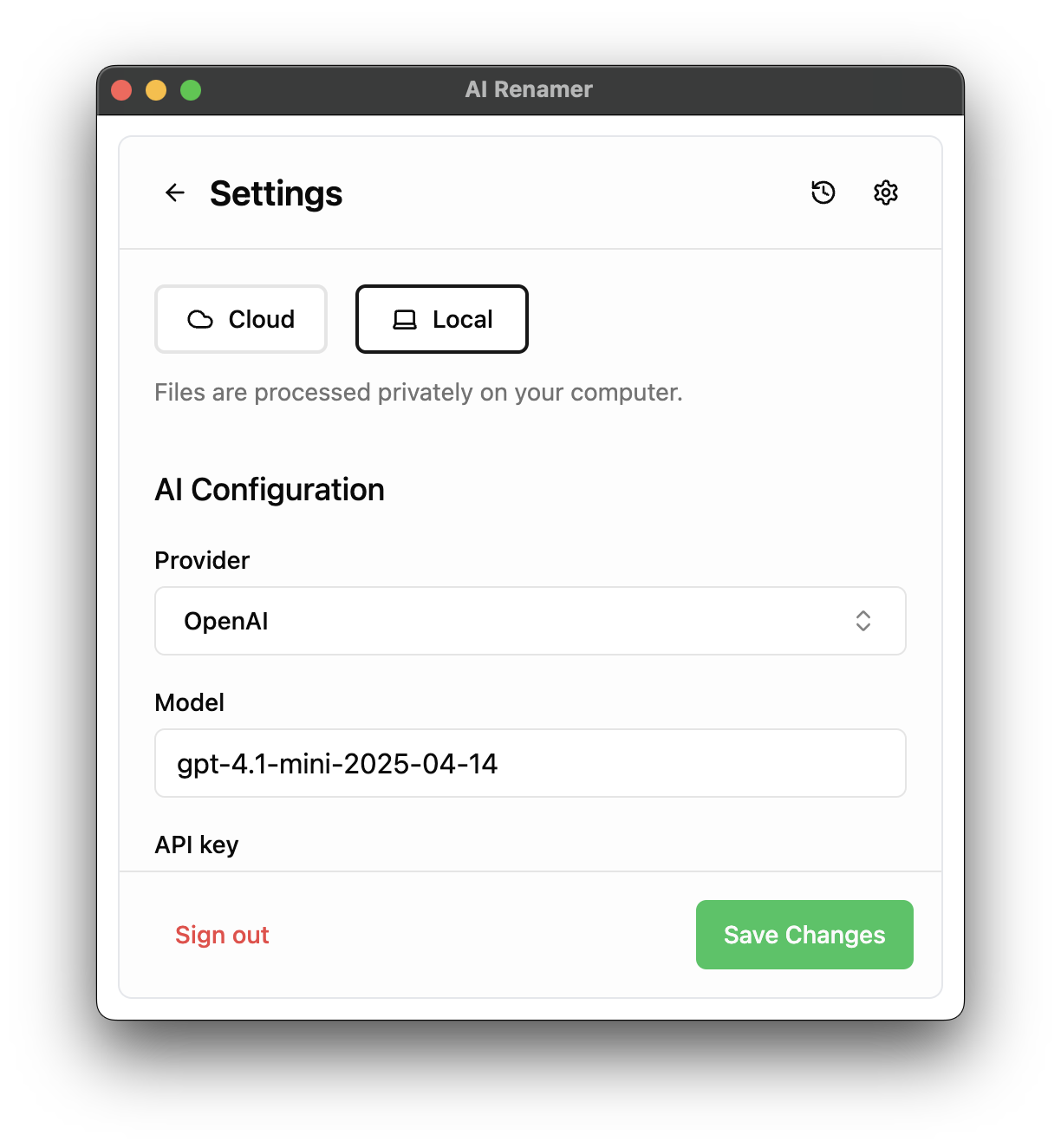
AI Renamer has two ways to run:
Local Mode
Use your own AI model locally through Ollama or LM Studio.
Works offline, perfect for privacy.
You can also connect API providers. Supported providers include OpenRouter and OpenAI, Google AI Studio and Groq.
Cloud Mode
Use built-in models like GPT, Llama and Llava for smart file naming.
3. Add Your Files
Drag and drop any files you want to rename.
AI Renamer supports:
- PDFs
- Images (JPG, PNG, GIF, BMP, TIFF, WEBP)
- Documents (TXT, HTML, CSS, JS, TS, MD, and other text-based files)
4. Pick or Customize Your Naming Style
AI Renamer can infer names automatically, or you can define a custom instructions such as:
| Example |
|---|
| {date}{client}{type} |
| {title}{year}{author} |
| {content}-{date} |
| and many more... |
5. Preview and Apply
You’ll see AI-generated name suggestions before applying any changes. If you don’t like it you can click regenerate. Once you’re happy with name, click Rename All and it’s done.
Hundreds of files, perfectly renamed in seconds.
🔒 100% Private in Local Mode
If you use local models, everything stays on your computer.
That’s why auditors, accountants, and legal professionals trust AI Renamer for sensitive documents.
💸 How to Use AI File Renaming for Free
You can use Local Mode after a one-time purchase. This lets you run AI models on your computer, such as Llava or one of Llama’s smaller models, without paying per file rename.
If your computer isn’t powerful enough to run local AI models, you can still use free AI models via OpenRouter and Groq. Check these step-by-step guides:
With Local Mode, all processing happens on your computer, so your files never leave your device. This means you can rename unlimited files privately and securely, with full control over your AI provider.
⚡ Bonus: Why It Beats Manual Renaming
| Method | Time (8 files) | Errors | Consistency |
|---|---|---|---|
| Manual Renaming | 52.44 s | Minor typos | Inconsistent |
| AI Renamer | 17.18 s | 0 | Perfectly consistent |
That’s 3× faster and a lot less painful.
❓ People Also Ask About Renaming Files with AI
Can AI automatically rename files?
Yes. AI can analyze a file’s content, or visual information and generate a descriptive name automatically.
For example, an AI tool can read a PDF invoice, detect the date, company name, and document type, and rename it to something like:
2025-04-02-Amazon-Invoice.pdf
Tools like AI Renamer automate this process so you can rename hundreds of files in seconds instead of doing it manually.
How do I rename files in bulk automatically?
The easiest way is to use an AI bulk file renamer.
With AI Renamer, you simply:
- Drag and drop multiple files
- Let the AI analyze their contents
- Preview the suggested names
- Apply them with one click
This allows you to rename hundreds of files instantly without scripts, regex, or coding.
Is there a free AI file renamer?
Be careful with tools that claim to be completely free, in many cases, your files may be uploaded, stored, or even used to train AI models without your knowledge. AI Renamer takes a different approach: it isn’t entirely free, but it’s designed for maximum control, privacy, and professional use.
Local Mode (one-time purchase)
- Pay once, no subscription required
- Supports unlimited renaming
- Gives you full provider control run local AI models (Ollama, LM Studio) or connect your own API keys (OpenAI, OpenRouter, Google AI Studio, Groq)
- Privacy-first: if you use a local AI model, files stay on your device; nothing is uploaded, nothing is shared
- Offline processing is possible with local models
Cloud Mode
- Uses built-in AI models
- Each rename consumes credits
- Secure and private: AI Renamer does not store or share your files, and all processing is temporary for renaming only
This flexibility allows professionals to control cost, privacy, and model quality, so you can rename files safely without sharing sensitive documents with third parties.
Can I rename files with AI without uploading them?
Yes. Some AI tools support local processing, meaning your files never leave your computer.
AI Renamer supports local AI models through Ollama or LM Studio, allowing you to rename files privately and offline. This is especially useful for sensitive documents like legal files, financial statements, or audit records.
Does using AI to rename files cost money?
It depends on the AI model you use.
For example:
- Cloud AI models usually charge per request or credit.
- API providers like OpenAI charge a small fee per usage.
- Local AI models can run on your computer with no per-rename cost once installed.
AI Renamer supports both cloud and local models, so users can choose the option that fits their budget and privacy needs.
🚀 Start Renaming with AI
You don’t need scripts, Python, or regex.
Just download AI Renamer, choose local or cloud mode, and start renaming your files smarter.
🧩 TL;DR
AI Renamer lets you rename files automatically using AI. No coding required. With local mode it’s complete privacy.