
PDF Renamer AI
Looking for a smarter PDF renamer AI? Tired of messy PDF filenames everywhere?
If you are new, start here:
AI Renamer automatically reads your PDF documents and generates clear, structured filenames in seconds.
Many PDF documents arrive with confusing names like:
scan_001.pdf
document_final_v3.pdf
file(27).pdf
Over time these files become impossible to search or organize.
AI Renamer works as a PDF Renamer AI that reads the content of your documents and automatically generates clear, descriptive filenames. AI Renamer works on both platforms. Installation takes minutes.
For Mac users:
How to Install AI Renamer on macOS (Step-by-Step with Screenshots)
For Windows users:
How to Install AI Renamer on Windows (Step-by-Step with Screenshots)
What Is a PDF Renamer AI?
A PDF renamer AI reads your PDF content. It understands what the document contains. Then it generates a meaningful filename automatically. Traditional renaming tools only change text patterns. They cannot understand document content. AI works differently. It can extract:
- Document title
- Company name
- Invoice number
- Statement date
- Contract type
Then it builds a structured filename. For example:
Before:
Untitled.pdf
After:
2026-02-24-Acme-Corp-Invoice.pdf
That is the power of AI document understanding.
How Does AI Rename PDF Files?
The process is simple and fast.
- Upload or select your PDF files
- The AI reads the document content
- It extracts key structured information
- It generates a suggested filename
- You preview before applying changes
Nothing is renamed without confirmation. This makes batch processing safe and controlled.
Real Examples of PDF Renaming With AI
Let us look at real world scenarios.
Bank Statements
 Bank statements often arrive with generic names. You may see files like
 statement.pdf.
AI can detect:
- Account holder name
- Statement period
- Bank name
Then rename it clearly:
john-smith-chase-bank-statement-2026-01.pdf
This makes monthly tracking much easier.
Invoices
 Accountants receive dozens of invoice PDFs monthly. Many are named
 scan.pdf or invoice_123.pdf.
AI can extract:
- Vendor name
- Invoice date
- Invoice number
Result:
marker-international-invoice-2026-02-01.pdf
Searching later becomes effortless.
Legal Contracts
 Law firms manage large contract libraries. Generic filenames create serious confusion.
AI can detect:
- Contract type
- Parties involved
- Execution date
Example:
settlement-agreement-doe-2025-03-20.pdf
Clear names reduce legal workflow friction.
Audit and PBC Documents
Auditors organize hundreds of supporting documents. PBC folders often contain poorly named PDFs.
AI can identify:
- Client name
- Document category
- Reporting period
Example:
blue-mint-revenue-recognition-2026-q1.pdf
Preparation time drops significantly.
Research Papers
 Researchers download many academic PDFs weekly. Most files have unclear autogenerated titles.
AI can extract:
- Paper title
- Research topic
- Publication year
Example:
review-quantum-machine-learning-healthcare-2026.pdf
Your academic library becomes searchable instantly.
Curious how AI Renamer can help with other file types too? Check out these examples: 10 Professional Use Cases for AI File Renaming Tool
Rename PDF Files Automatically
If you regularly deal with poorly named PDFs, AI Renamer can rename them in seconds.
- Reads PDF content automatically
- Generates structured filenames
- Works with batches of documents
- Supports Mac and Windows
👉 Try AI Renamer for free
Can You Batch Rename PDF Files?
Yes, batch renaming is fully supported. You can rename multiple PDFs at once. You can also process entire folders quickly.
This is ideal for:
- Monthly financial documents
- Large invoice archives
- Legal case folders
- Scanned document libraries
- Academic research collections
Instead of hours, it takes minutes.
Is PDF Renamer AI Safe?
Many PDFs contain sensitive information such as financial statements, contracts, or invoices. Because of this, AI Renamer offers two processing options.
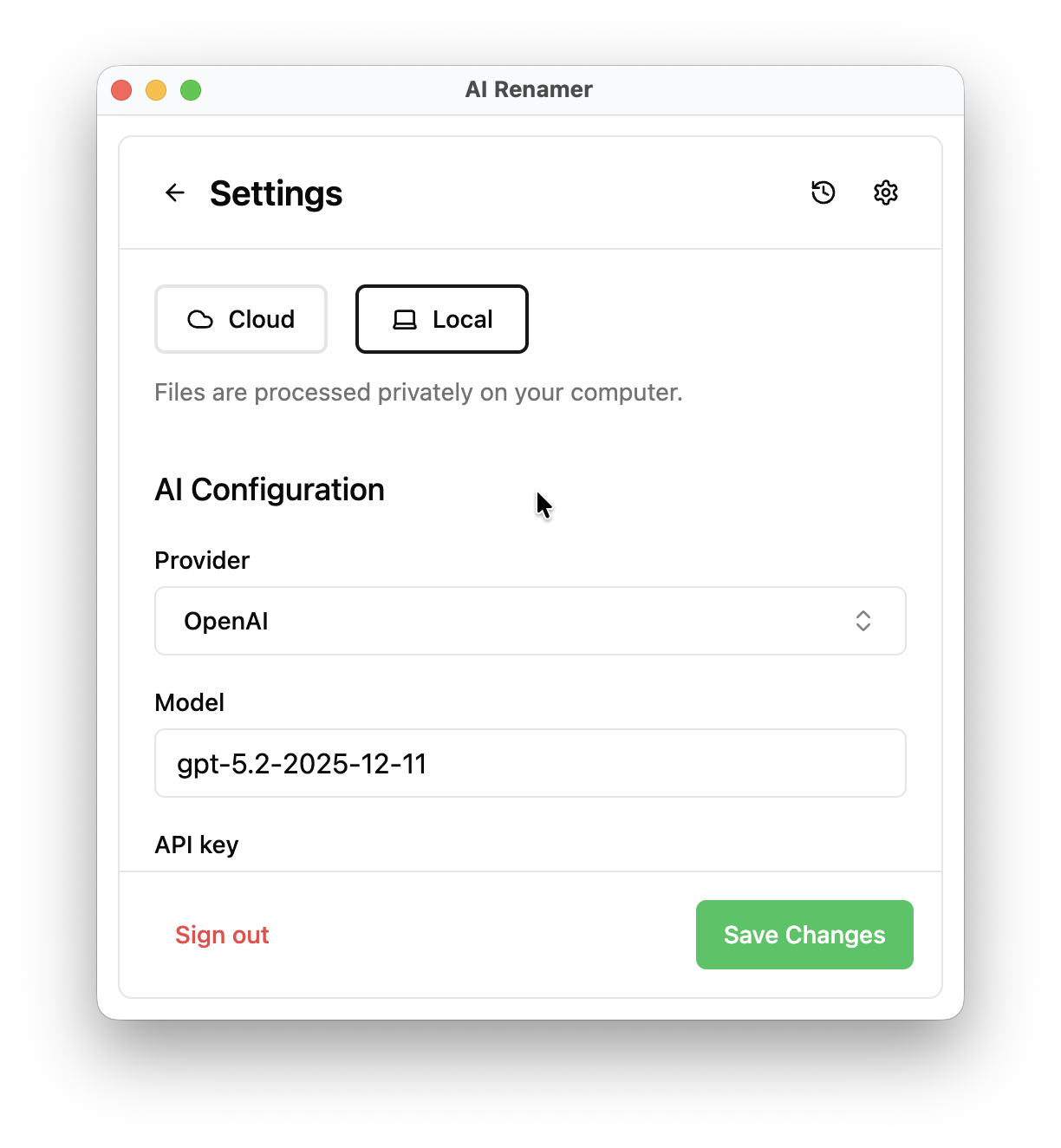
Cloud Mode
Cloud Mode works instantly after installation. No AI provider setup is required. Each rename uses one credit, and files are processed securely without being stored. This is ideal for quick setup.
Local Mode
Local Mode processes files directly on your computer using local AI models or your own API providers.
This mode is ideal for sensitive workflows such as:
- Financial records
- Legal documents
- Internal company reports
Why Use AI Renamer for PDF Files?
AI Renamer is designed for people who handle large numbers of documents.
Instead of manually opening every file and renaming it, the AI reads the document and generates a clear filename instantly.
Key benefits:
- Automatically understand PDF content
- Batch rename large folders
- Preview filenames before applying changes
- Custom naming patterns
- Works with PDFs, images, and text files
If you rename documents regularly, this automation saves hours every month.
Who Should Use a PDF Renamer AI?
This tool is perfect for:
- Accountants managing invoices
- Auditors preparing workpapers
- Lawyers organizing contracts
- Consultants handling client files
- Researchers building PDF libraries
- SMB owners cleaning financial folders
If file chaos slows your workflow, AI renaming solves it quickly.
FAQ

Can AI rename PDF files automatically?
Yes. AI Renamer reads the content of a PDF document and generates a descriptive filename based on information like title, company name, and date.
Can I rename multiple PDFs at once?
Yes. AI Renamer supports batch renaming and folder processing, allowing you to rename hundreds of PDFs in minutes.
Does AI Renamer store my documents?
No. Files are processed for renaming only and are not stored after processing.
Does it work offline?
Yes. Local Mode allows you to run local AI models directly on your computer for fully offline PDF renaming.
Try a Smarter PDF Renamer
Manual PDF renaming wastes time and creates messy folders.
AI Renamer solves this by reading document content and generating structured filenames automatically.
Whether you manage invoices, contracts, research papers, or audit files, AI Renamer helps you organize documents in seconds.
👉 Download AI Renamer and start renaming PDFs with AI.