How Paralegals Rename Clio Files Without Manual Renaming
Manual file renaming is a time-consuming task for most paralegals. It’s repetitive work that has to be done, but rarely adds real value.
If you’re using Clio, you already know the pain:
- Intake forms uploaded as
scan_0034.pdf - Bank statements named
doc_9.pdf - IDs, medical records, and correspondence dumped into a case with zero structure
The result? Slower case prep, frustrated attorneys, and hours lost to manual renaming.
In this guide, we’ll break down how paralegals are organizing Clio documents without manual renaming-using repeatable systems and light automation that actually stick.
The Real Problem Isn’t Clio - It’s What Comes Before Clio
Clio is great at case management, but it assumes documents arrive in decent shape.
In reality, documents come from everywhere:
- Clients emailing photos from their phones
- Banks exporting generic PDFs
- Government portals using unreadable filenames
- Scans from copiers with default names
By the time files hit Clio, the damage is already done.
That’s why the most effective paralegals fix document organization before upload.
Some teams use tools like AI Renamer at this stage to clean up filenames before documents ever reach Clio.
The Old Way: Manual Renaming (And Why It Doesn’t Scale)
Most teams rely on some version of this workflow:
- Open the document
- Read it
- Rename it manually
- Move it into the correct folder
- Upload to Clio
This works-until volume increases.
At 5–10 files per day, it’s manageable. At 20–100 files per case, it becomes a bottleneck.
Worse, naming conventions drift over time:
ClientID_BankStmt_March2024.pdfBank Statement - March.pdfMarch Bank.pdf
Same document. Three different styles. Zero consistency.
What Organized Paralegals Do Differently
High-performing legal teams follow three principles:
1. Standard Naming Rules (Simple, Not Perfect)
They don’t over-engineer. Most use:
[Client Name or ID] – [Document Type] – [Date]
Examples:
Smith John – Driver License – 2024-01-12.pdfACME Corp – Bank Statement – 2024-03.pdf
The key is consistency, not rules.
2. Pre-Upload Organization
Instead of fixing messes inside Clio, they:
- Organize files locally or in a shared drive
- Rename and group documents before upload
- Treat Clio as the final destination, not the workspace
This alone saves hours per case.
3. AI File Renaming Based on Content
This step is optional, but it is what separates partially organized teams from very efficient ones.
Some paralegals still rename files by hand, but they do it before uploading to Clio. Others do not rename files manually at all.
Instead of opening each document and deciding what to call it, they use AI file renaming tools like AI Renamer before uploading to Clio.
If you are new to AI Renamer, start here:
Here is exactly what that means in practice:
- AI Renamer reads the content of the file (PDFs, scans, images)
- It identifies what the document actually is (ID, bank statement, intake form, invoice, etc.)
- It applies a predefined naming format automatically
So instead of guessing or typing names by hand, filenames are generated based on what is inside the document.
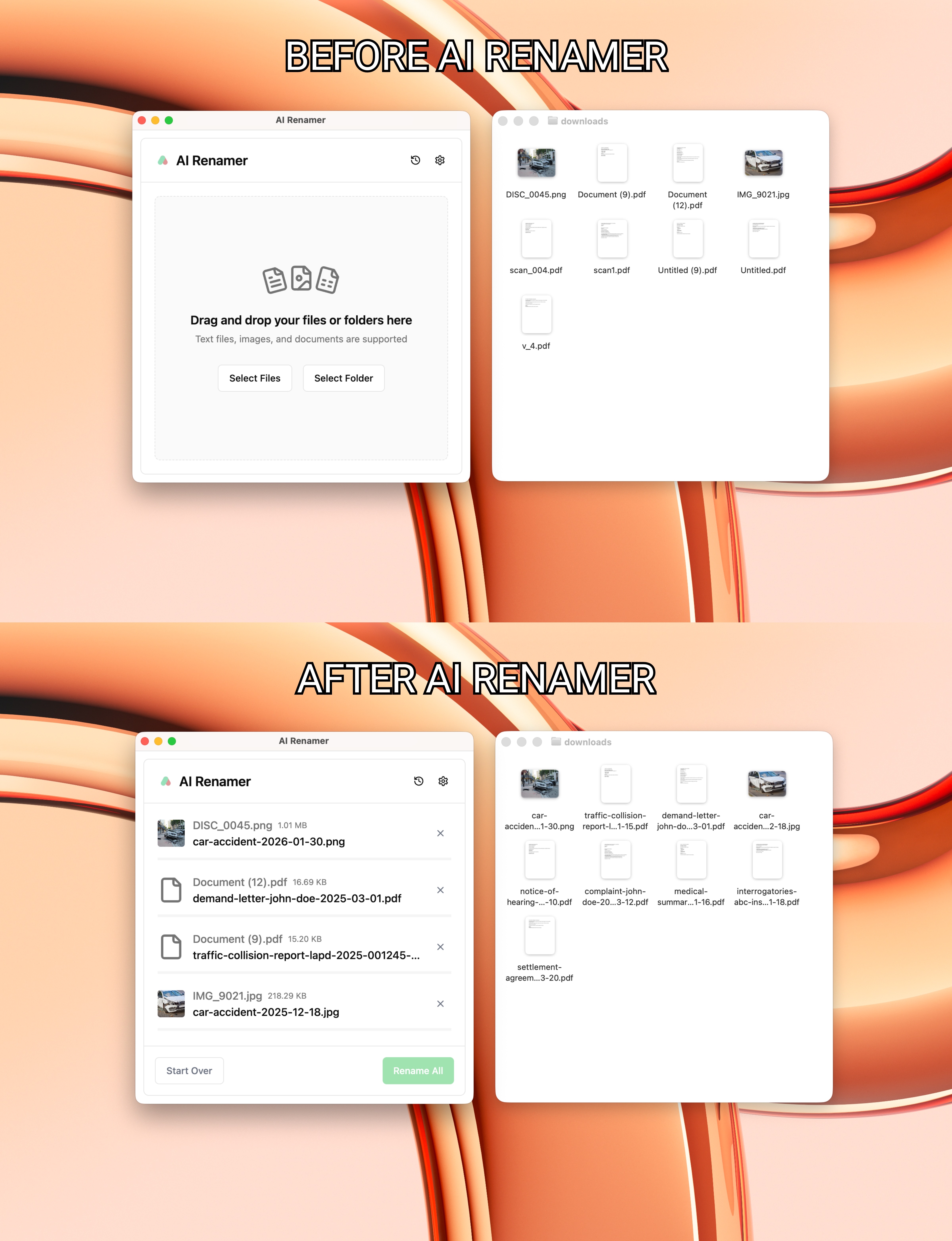 For example:
IMG_4829.jpgbecomesDoe-Jane-Passport-2022.pdfscan_001.pdfbecomesClient-Intake-Form-2024-02-03.pdfDISC_0045.pngbecomescar-accident-2026-01-30.png
The paralegal checks the filenames, but does not type them manually.
The result is clear filenames and less manual work.
For teams handling large volumes, this is often where tools like AI Renamer replace manual renaming altogether.
If you work with scanned PDFs in legal cases, this process is explained in more detail here: How to Automatically Rename Scanned PDFs for Lawyers Using AI
A Simple Workflow That Actually Works
Here’s a real-world setup many paralegals use:
- Collect documents from email, portals, scans
- Batch rename files with AI, using local models on your machine
- Quick preview to verify names look right
- Upload clean named files into Clio
Total time: minutes instead of hours.
This workflow is especially useful when using tools like AI Renamer to handle batch renaming before upload.
Need AI Renamer installation help?
How to Install AI Renamer on macOS
How to Install AI Renamer on Windows
What About Confidentiality?
This is a valid concern in legal work.
That’s why many teams prefer AI Renamer, which works in a simple and controlled way:
- The file is read only to generate a new name
- The document is not saved or kept by AI Renamer
- After renaming, the file stays with the user
In short, the tool looks at the file, renames it, and moves on.
Privacy and control still matter, and automation does not have to add risk.
The Payoff: Less Cleanup, Faster Casework
Paralegals using this approach report:
- Faster document retrieval in Clio
- Fewer attorney interruptions
- Cleaner audits and handoffs
- Less end-of-day cleanup stress
Most importantly, they spend more time on actual legal work, not manual file renaming.
Final Thoughts
Clear file names are important, but manually renaming files takes up time every week.
If your Clio workspace feels messy, the solution isn’t more folders or stricter rules. It’s fixing document names before they ever reach Clio.
That’s where AI Renamer fits in.
AI Renamer helps paralegals rename PDFs, scans, and images based on their actual content. Files are processed locally or in the cloud, previews are shown before applying changes, and nothing is stored.
Instead of spending time renaming files one by one, you can:
- Drop in a folder of documents
- Apply a clear naming format
- Upload clean, readable files into Clio
Clear file naming rules matter, but they do not require manual work.
Try AI Renamer before your next Clio upload and see how much time manual renaming is really costing you.