File Naming Conventions Best Practices (2026 Update)

We’ve all been there, opening a folder filled with chaos:
Untitled.pdf, Screenshot (2).png, PBC-list-v3.pdf, IMG_0043.jpg.
In 2026, file naming still wastes countless hours every week. File naming conventions are simple rules for naming files so they’re easy to find, sort, and understand without opening them.
Whether you’re an accountant, photographer, student, or designer, consistent naming helps you stay organized, searchable, and compliant.
But keeping it consistent manually? That’s boring and time-consuming.
Let’s walk through smart file naming best practices for 2026 and see how AI Renamer can automate the entire process for you.
💡 Why File Naming Still Matters in 2026 (Efficiency, Compliance, Searchability)
Clean naming is more than just organization, it’s efficiency.
A McKinsey study found that employees spend up to 19% of their workweek searching for information.
With predictable file names, you cut that time dramatically.
For anyone managing large sets of files, from receipts to photos to project reports, clear naming improves searchability, collaboration, and version control.
📘 File Naming Conventions Best Practices for 2026
Here are the conventions professionals still rely on, refreshed for modern workflows:
✅ Keep names short but descriptive
Skip generic labels like IMG0043.jpg or Finalv2.pdf.
✅ Use a consistent date format (YYYY-MM-DD)
Dates sort automatically:
Use 2026-03-14_invoice_acme.pdf instead of scanned (8).pdf.
✅ Keep it system-friendly
Spaces and special symbols can cause upload or sync issues.
Replace them with dashes or underscores for cleaner names:
project-budget-2026.pdf ✅
project_budget_2026.pdf ✅
Project Budget (Final).pdf ❌
✅ Stick to lowercase for compatibility
✅ Include version or status tags
_v1, _signed, _final are lifesavers.
✅ Mirror your folder structure
If your folder is /2026/Clients/, your file should follow the same logic.
🧩 Example: Clean Naming in Action
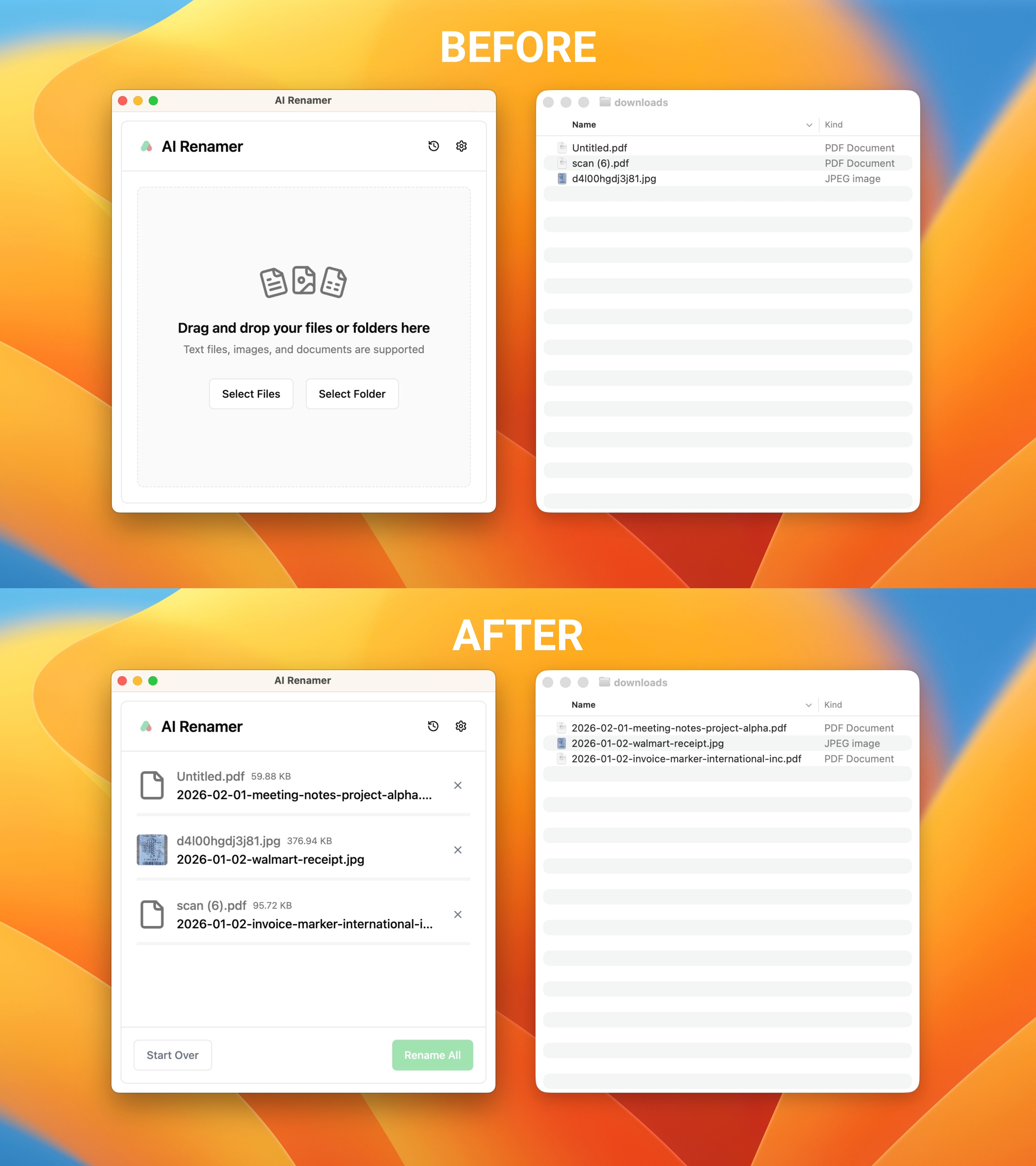
2026-02-01_meeting-notes_project-alpha.pdf
2026-01-02_receipt_walmart.jpeg
2026-01-02-marker-international-inc.pdf
These names are searchable, automation-friendly, and universally readable.
✨ Enforce Naming Conventions with Custom Case Styles
 Even with agreed-upon rules, teams rarely stick to one format.
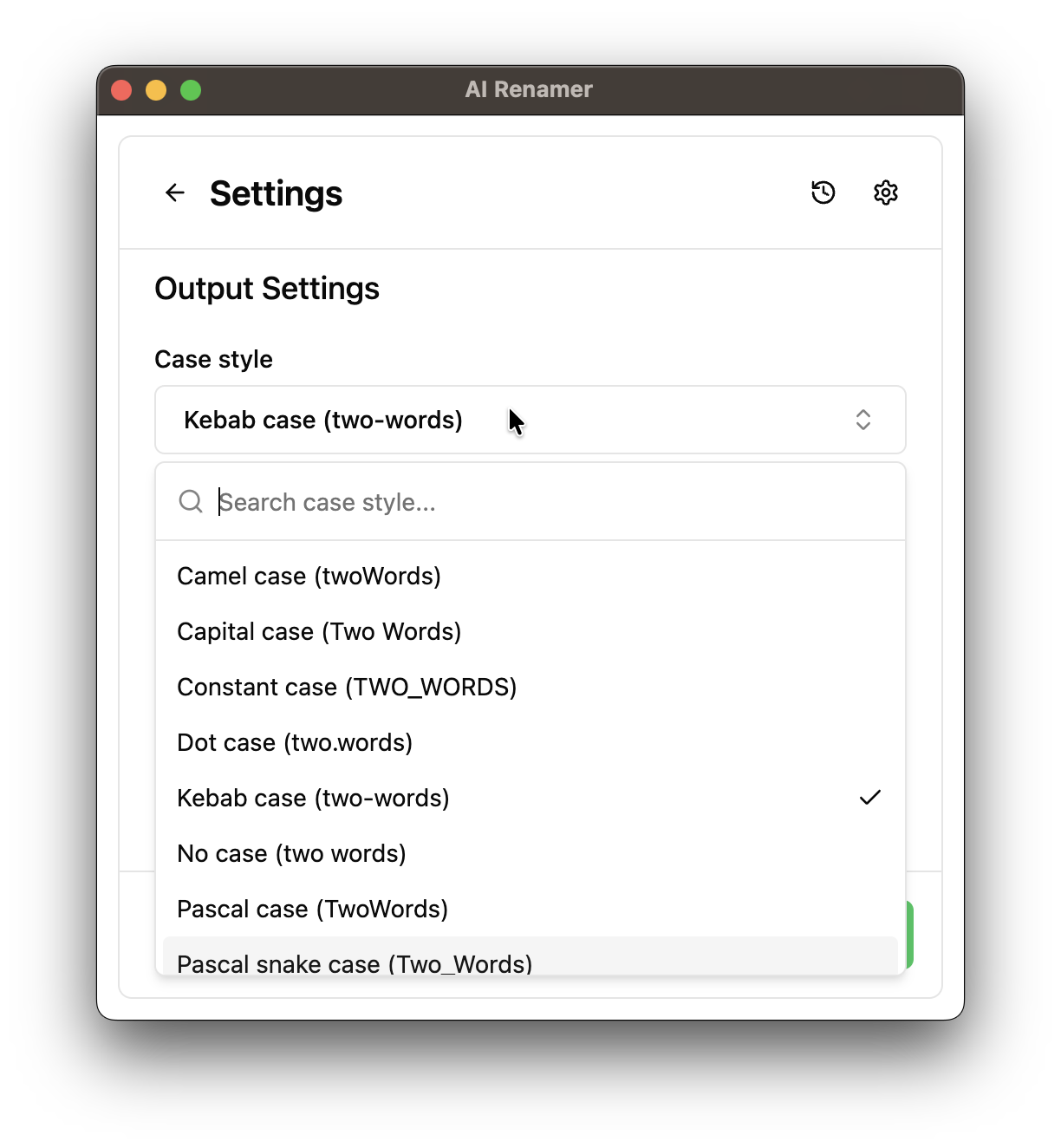
AI Renamer fixes that with built-in case style presets ensuring every renamed file follows the same pattern automatically.
You can choose from:
- 🟢 Kebab case →
project-report.pdf - 🟢 Snake case →
project_report.pdf - 🟢 Camel case →
projectReport.pdf - 🟢 Pascal case →
ProjectReport.pdf - 🟢 Constant case →
PROJECT_REPORT.pdf - 🟢 Capital case →
Project Report.pdf
Just pick your style from the dropdown, AI Renamer handles the rest.
No scripts. No manual editing. Total consistency.
💡 Combine this with AI Renamer’s Custom Instructions:
Custom Instructions Example for Accountants “Rename all invoice PDFs using date + client name.”
⚙️ The 2026 Twist: AI Handles It for You
Manual naming rules are great, but automation is better.
AI Renamer uses advanced models to analyze each file’s content and generate clear, human-readable names, instantly.
Supports:
- PDFs (text or image-based invoices, bank statements, receipts, research articles)
- Images: JPG, PNG, GIF, BMP, TIFF, WEBP
- Text files: TXT, HTML, CSS, JS, TS, MD, and other plain-text formats
📄 Note: .docx, .xlsx, or other proprietary binary formats aren’t supported yet. Want this feature? Request it → airenamer.canny.io
🧠 How It Works
Drop your files into AI Renamer
The app analyzes them (offline or via cloud AI models)
It suggests structured names, preview before applying
Rename hundreds of files in one click
🔒 Privacy-first: AI Renamer works offline with local mode so your files never leave your device.
👉 Try it now with 10 free credits: airenamer.app
🧩 Example: Before vs After
| Before | After |
|---|---|
IMG_0443.jpg |
2026-01-12_vacation-lisbon.jpg |
Scan001.pdf |
2026-02-10_invoice_acme-corp.pdf |
notes.txt |
2026-03-01_meeting-summary_project-alpha.txt |
No guessing. No renaming fatigue. Just order.
✅ File Naming Checklist for Teams
- Follow ISO date format (YYYY-MM-DD)
- Avoid spaces and special characters
- Use consistent casing (lowercase or defined style)
- Include version tags
- Match folder structure
- Automate with AI tools
- Document your naming rules (README.md or internal wiki)
🚀 Final Thoughts
In 2026, good file naming is no longer a manual habit, it’s an automated workflow.
AI Renamer turns messy folders into organized systems by combining AI understanding + naming conventions + case consistency.
Whether you’re renaming audit files, receipts, or photo archives, you can save hours and eliminate confusion in seconds.
👉 Rename your files with AI: airenamer.app